---
title: "Introducing Citry"
url: https://citry.dev/blog/introducing-citry/
description: "Why I built a fully typed frontend framework for Python, and why you should use it too."
date: "2026-09-04T15:15:00+02:00"
author: "Juro Oravec"
author_url: "/community/people/"
tags:
- "Project updates"
---
## Citry is here
Hi, I'm Juro, the maintainer of [django-components](https://github.com/django-components/django-components){: target="\_blank" rel="noopener"}.
After roughly 2-2.5 years of working towards bring the experience of React and
Vue to Python, I'm proud to release [Citry](https://github.com/citry-dev/citry){: target="\_blank" rel="noopener"}.
Citry is a fully typed frontend framework for Python with server events and
Alpine.js, inspired by Vue and Livewire.
How it works:
- You write components as Python classes.
- Put component HTML, JS, and CSS next to your Python logic.
- And compose those components into pages.
It comes with
a [UI library](/ui-library/),
[editor support](/ide/vscode/),
Citry works with any Python web framework - Django, FastAPI, Flask, even plain WSGI/ASGI. See [integrations](/web-frameworks/).
You can try it without installing anything in the [playground](/playground/).
It's now in public beta. If you'd rather see how it works, I recorded a Citry and Django code-along:
Watch the 50-minute Citry and Django code-along on YouTube
## Two years in the making
Around 2024, I was working on a Django codebase at [DCode](https://dcode.co/){: target="\_blank" rel="noopener"}. We started out with plain Django templates.
As the codebase got bigger, I started running into lots of bugs and slowed productivity:
- Missing or misspelt variable names.
- Template variables leaking into other templates.
- Navigating the template tree felt like a bog.
From memory, roughly every eighth ticket was a bug fix. That gives you an idea of how it
felt.
I explored how to manage the project better. I tried
[django-slippers](https://github.com/mixxorz/slippers){: target="\_blank" rel="noopener"},
and then landed on [django-components](https://github.com/django-components/django-components){: target="\_blank" rel="noopener"}.
I started contributing to django-components, trying to make the experience better.
*NOTE: I'm eternally grateful to
[Emil Stenström](https://github.com/EmilStenstrom){: target="\_blank" rel="noopener"},
the original author of django-components, who trusted me with with the tons of changes and new features.*
But there is only so much you can do on top of Django, due to how it's been designed:
- Each [Django template tag](https://docs.djangoproject.com/en/6.1/ref/templates/builtins/){: target="\_blank" rel="noopener"}
has its own logic for parsing the inputs.
- You can't do static anaysis on top of that when in one tag `foo` is a variable, while in
another it's a string. You can't trace variables, check types, etc...
- Passing variables to templates is implicit in Django.
- You have no source of truth. Without that, templates can't reject or type-check given context variables.
- What's worse, a change in an unrelated template could break a deeply nested template. You get no warning.
- Django's `TEMPLATE_STRING_IF_INVALID` is a design mistake that hides genuine errors.
Refactoring templates/components was a mess. If I changed the inputs of a component,
I had to search for every occurrence of its template tag, update the calls,
then test the pages to see whether everything still worked. In a TypeScript
project, I could change a typed function's inputs and `tsc` would tell me
which calls no longer matched. I wanted something like that for
Django / django-components too.
And it wasn't just type checking. In Vue or React, I could Ctrl-click a
component tag and jump to its definition. In my Django workflow, I would
copy the component name, open global search, and find it that way. Forgot
what inputs it accepted? Search again, or look up the docs. There were no
input hints or hover explanations in the workflow I was using.
Testing templates meant setting up Django and its settings, including
a mock database. Why do I need to set up
a database connection and run all migrations before I render HTML...?
Templates should be pure functions - predictable and with explicit inputs.
As a maintainer, I had low confidence in how django-components behaved when used with caching or multi-threading.
It was a black box, because it was built on top of Django.
These things add up. I wanted to define a component, know what goes in and
what comes out, test it on its own, and have my editor help me when I changed
it.
You can see an early part of that journey in my
[AlpinUI introduction video](https://www.youtube.com/watch?v=V0tMYsy3RgQ){: target="\_blank" rel="noopener"}.
The work on AlpinUI and django-components kept pushing me in this direction.
Later, I wrote down some of the reasons for taking control of the template
language in the [template versions discussion](https://github.com/django-components/django-components/issues/1499){: target="\_blank" rel="noopener"}.
Citry is where that work has led.
## What building with Citry looks like
The basic idea is familiar if you've used Vue: a component can keep its
template, styles, and browser behavior together. In Citry, that component is
a Python class.
For example, here's a card with a button that shows or hides a list of
messages. Save this as `welcome.py`:
```citry
from citry import Component
class WelcomeCard(Component):
class Kwargs:
name: str
messages: list[str]
def template_data(self, kwargs: Kwargs, slots):
return {"name": kwargs.name, "messages": kwargs.messages}
def js_data(self, kwargs: Kwargs, slots):
return {"open": False}
template = """
Hello, {{ name }}!
{{ message }}
No new messages.
"""
class Page(Component):
template = """
Welcome
"""
print(Page())
```
Install Citry and run the file:
```console
python -m pip install citry
python welcome.py > welcome.html
```
Open `welcome.html` in a browser. You'll see “Hello, Ada!” and a button.
Click it and the two messages appear; click again and they disappear.
Citry includes the browser runtime in the rendered document, so this example
doesn't need a running web server.
Python supplies the name and messages. `js_data()` supplies the browser's
initial `open` value, and Alpine handles the button click. The `c-for`
attribute repeats the list item for each message, while `c-empty` handles
an empty list.
The other interesting part is the component call. Static inputs look like
HTML attributes. With the `c-` prefix, the input is a Python expression,
which is why we can pass a list directly. The child receives those inputs
explicitly; it doesn't have to guess what happens to be in the parent's
context.
### When a click needs Python
For an action that needs the server, Citry lets you define Python handlers
inside the component. E.g. this component returns a browser event with a
message when you click its button:
```citry
from citry import Component
from citry.ext.events import actions
class ServerGreeting(Component):
class Events:
def greet(self):
return actions.Dispatch(
"greeting:ready",
{"message": "Hello from Python!"},
)
template = """
"""
```
The [server events tutorial](/getting-started/call-python/)
walks through those pieces and serving the page.
Here, `@c-click` sends the click to Python, and the returned action gives the
browser the message to display. Citry integrates with [Django, FastAPI,
Flask, Starlette, ASGI, and WSGI](/web-frameworks/), so you can use this with the backend you
already have.
## Catch mistakes while you build
The component syntax is only part of what I wanted. The other part is being
able to change things without having to manually rediscover every place
where I broke them.
For the card above, `name` and `messages` are required inputs. Suppose I
use that component in a template and forget the name:
```citry-html
```
Citry catches this when it parses the template and points to the component
tag. The relevant part of the error is:
```text
Tag '' must have one of the following attributes: 'name', 'c-name'.
```
If I mistype it as `naem`:
```citry-html
```
Citry reports the allowed attributes and identifies the typo:
```text
Found invalid attributes: naem.
```
That's the part I was missing in Django: checking the places where I USE a
component, inside the templates. If I rename an input or add a required one,
the old component tags become errors that the linter can point out.
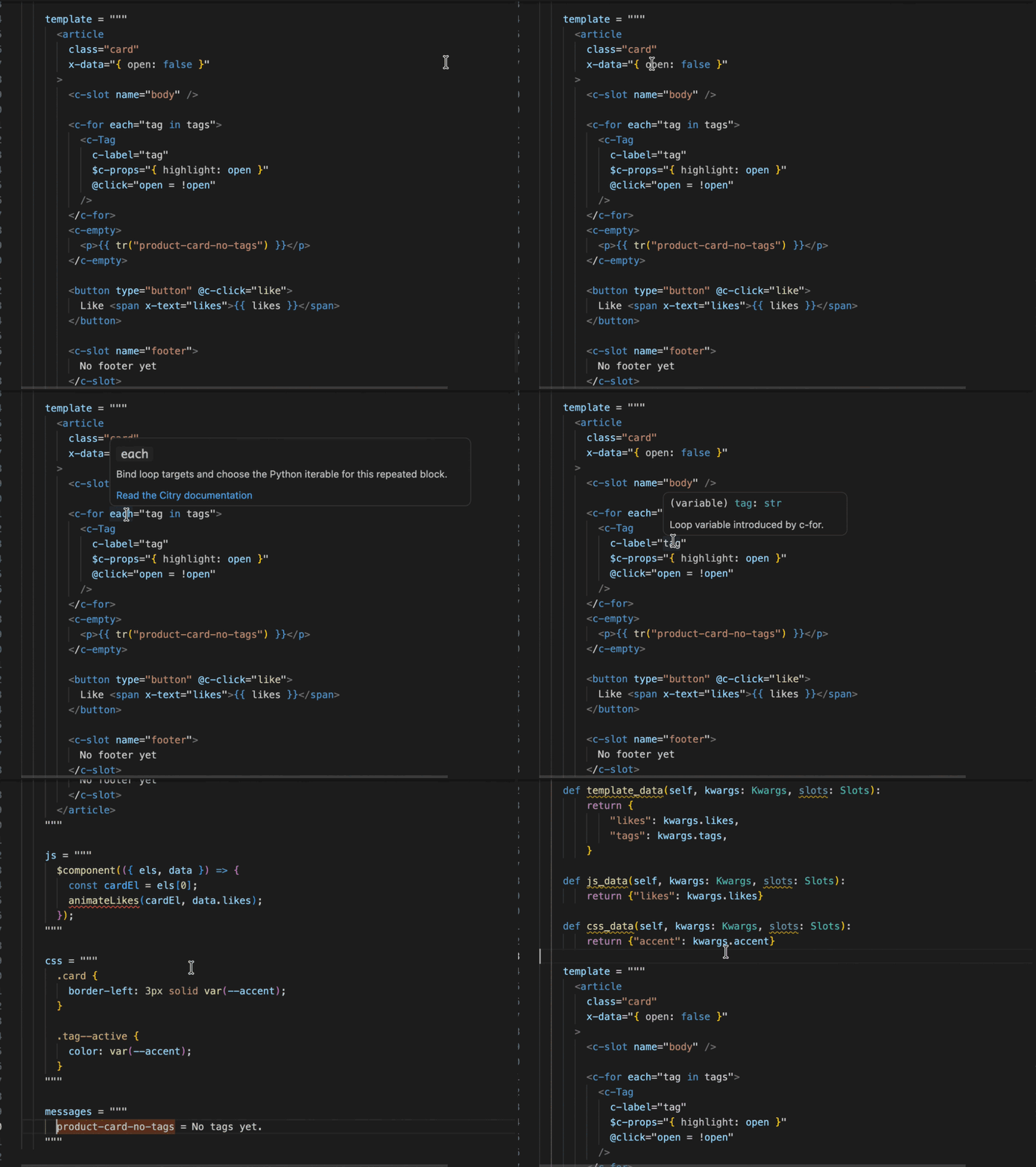
The [VS Code extension](/ide/vscode/) adds completion, hover information,
navigation, and diagnostics inside the component.
You can also use the linter as CLI in you CI/CD, so you don't ship broken UI.
Dare I say, Citry will catch more bugs than any other Python frontend
framework.
### Why this matters for AI development
This makes Citry particularly interesting for building with AI agents.
An agent can generate a lot of code quickly, but it still needs feedback
about whether that code is correct. If it invents an input, forgets a required
value, or writes an invalid template, the framework and tools should tell it
what went wrong so it can fix the mistake.
I'd love to see this tested properly too: Run public becnhmarks, asking different
coding agents to build the same application with different frameworks,
record the errors they hit, and check whether the resulting applications actually work.
Those benchmarks will let us see how well this works in practice.
## What you can use today
Alongside the core framework, there's already quite a bit to try:
- [Citry UI](/ui-library/) provides ready-made components for forms,
navigation, dialogs, tables, and other parts of an application. You don't
have to begin by writing every button yourself.
- [Editor support](/ide/vscode/) connects the Python and template parts of
your components, with completion, navigation, and error feedback.
- [The playground](/playground/) lets you experiment in the browser.
- [Examples](/examples/) and the
[getting-started tutorial](/getting-started/installation/) take you from
rendering a component to handling server interactions.
- [Integrations](/web-frameworks/) connect Citry to Python web frameworks,
and [community extensions](/community/extensions/) add other ways to use it
in an existing project.
There are also features I haven't tried to squeeze into this introduction,
like [translations with Fluent](/i18n/),
[caching](/advanced/caching/), or
[HTML fragments](/advanced/html-fragments/).
## Start gradually in an existing Django project
If you're coming from Django or django-components, you can migrate gradually. You don't need to rewrite the whole frontend in one go.
[Joey Jürjens](https://github.com/joeyjurjens){: target="\_blank" rel="noopener"}
has built
[citry-django](https://github.com/joeyjurjens/citry-django){: target="\_blank" rel="noopener"},
a package
that lets you use Citry components inside Django templates, and Django
template tags inside Citry components.
For example, an existing Django template can contain a Citry component:
```citry-html
{% extends "base.html" %}
{% block content %}
{% endblock %}
```
Its
[README](https://github.com/joeyjurjens/citry-django#installation){: target="\_blank" rel="noopener"}
has the setup instructions, including an optional integration for django-components.
citry-django adds the ability to mix the template languages. That gives you a
way to adopt Citry gradually while continuing to use the Django parts of your
application.
When you are ready to port components, follow the
[django-components migration guide](/guides/migrate-from-django-components/).
It covers the template, Python, asset, extension, and testing changes and
includes a checklist you can give to a coding agent.
This is different from Citry's own [Django integration](/web-frameworks/#django), which handles serving components and event routes.
## What comes next
The core is complete. Next, I want to focus on convenience.
Django makes forms and an admin dashboard very convenient, and I'd like people to have that kind of
convenience when choosing Citry too.
I'd like to use GitHub stars as community milestones for this work:
- **250 stars: forms from Python classes.** Define a form as a Python class
and have a component render its HTML and send the form data to the server
through Citry events. The goal is something comparable to Django Forms,
built on top of Citry.
- **500 stars: a minimal admin.** Define the data models to display and
generate read-only admin pages, including pagination and individual entry
pages.
- **1,000 stars: editing and ORM integrations.** Add create, update, and
delete actions, with integrations for Django ORM and SQLAlchemy.
- **1,500 stars: an admin broadly comparable to Django's.** It should be useful
enough that people don't have to keep Django templates solely because they need the admin.
Citry already has form components and server events. What I'm talking about
here is generating the form or admin interface from your Python definitions,
so you have less repetitive application code to write.
If you have a use case for this, I'd love to hear it. E.g. which parts of
Django's templates or admin do you depend on, and what would you do differently?
## Try Citry in your project
The [playground](/playground/) is the quickest way to have a look, and the
[getting-started guide](/getting-started/installation/) walks through building
an application. Or follow the code-along at [the top of this post](#citry-is-here) and see how
it feels in Django.
Try it on a small part of something you're building and
[tell me how it went](/community/help/). I'm happy to help you get started,
and I'd especially like to hear about the things that feel awkward or don't
work the way you expected.
If you're considering using Citry in your project, reach out on
[Discord](https://discord.gg/NaQ8QPyHtD). I'd love to hear what you're
building, talk through whether Citry fits, and help you get started.
## Help build Citry
I'm also looking for more contributors. I'd love someone to
lead the design of [Citry UI](/ui-library): help decide how the components look and feel,
and make them work well together as a library.
There's plenty to do beyond code too. If you enjoy introducing people to
new tools, writing tutorials, making videos, or giving talks, I'd love your
help getting Citry out there. And if you'd like to contribute code, improve
the docs, or build an integration, come say hi on
[Discord](https://discord.gg/NaQ8QPyHtD){: target="\_blank" rel="noopener"}.
Tell me what interests you and we can find something to work on.
Give
[Citry a star on GitHub](https://github.com/citry-dev/citry){: target="\_blank" rel="noopener"},
[get involved](/community/contributing/)
or [sponsor the work](https://github.com/sponsors/JuroOravec){: target="\_blank" rel="noopener"}.
There's a lot more to be built :)
 ### Why this matters for AI development
This makes Citry particularly interesting for building with AI agents.
An agent can generate a lot of code quickly, but it still needs feedback
about whether that code is correct. If it invents an input, forgets a required
value, or writes an invalid template, the framework and tools should tell it
what went wrong so it can fix the mistake.
I'd love to see this tested properly too: Run public becnhmarks, asking different
coding agents to build the same application with different frameworks,
record the errors they hit, and check whether the resulting applications actually work.
Those benchmarks will let us see how well this works in practice.
## What you can use today
Alongside the core framework, there's already quite a bit to try:
- [Citry UI](/ui-library/) provides ready-made components for forms,
navigation, dialogs, tables, and other parts of an application. You don't
have to begin by writing every button yourself.
- [Editor support](/ide/vscode/) connects the Python and template parts of
your components, with completion, navigation, and error feedback.
- [The playground](/playground/) lets you experiment in the browser.
- [Examples](/examples/) and the
[getting-started tutorial](/getting-started/installation/) take you from
rendering a component to handling server interactions.
- [Integrations](/web-frameworks/) connect Citry to Python web frameworks,
and [community extensions](/community/extensions/) add other ways to use it
in an existing project.
There are also features I haven't tried to squeeze into this introduction,
like [translations with Fluent](/i18n/),
[caching](/advanced/caching/), or
[HTML fragments](/advanced/html-fragments/).
## Start gradually in an existing Django project
If you're coming from Django or django-components, you can migrate gradually. You don't need to rewrite the whole frontend in one go.
[Joey Jürjens](https://github.com/joeyjurjens){: target="\_blank" rel="noopener"}
has built
[citry-django](https://github.com/joeyjurjens/citry-django){: target="\_blank" rel="noopener"},
a package
that lets you use Citry components inside Django templates, and Django
template tags inside Citry components.
For example, an existing Django template can contain a Citry component:
```citry-html
{% extends "base.html" %}
{% block content %}
### Why this matters for AI development
This makes Citry particularly interesting for building with AI agents.
An agent can generate a lot of code quickly, but it still needs feedback
about whether that code is correct. If it invents an input, forgets a required
value, or writes an invalid template, the framework and tools should tell it
what went wrong so it can fix the mistake.
I'd love to see this tested properly too: Run public becnhmarks, asking different
coding agents to build the same application with different frameworks,
record the errors they hit, and check whether the resulting applications actually work.
Those benchmarks will let us see how well this works in practice.
## What you can use today
Alongside the core framework, there's already quite a bit to try:
- [Citry UI](/ui-library/) provides ready-made components for forms,
navigation, dialogs, tables, and other parts of an application. You don't
have to begin by writing every button yourself.
- [Editor support](/ide/vscode/) connects the Python and template parts of
your components, with completion, navigation, and error feedback.
- [The playground](/playground/) lets you experiment in the browser.
- [Examples](/examples/) and the
[getting-started tutorial](/getting-started/installation/) take you from
rendering a component to handling server interactions.
- [Integrations](/web-frameworks/) connect Citry to Python web frameworks,
and [community extensions](/community/extensions/) add other ways to use it
in an existing project.
There are also features I haven't tried to squeeze into this introduction,
like [translations with Fluent](/i18n/),
[caching](/advanced/caching/), or
[HTML fragments](/advanced/html-fragments/).
## Start gradually in an existing Django project
If you're coming from Django or django-components, you can migrate gradually. You don't need to rewrite the whole frontend in one go.
[Joey Jürjens](https://github.com/joeyjurjens){: target="\_blank" rel="noopener"}
has built
[citry-django](https://github.com/joeyjurjens/citry-django){: target="\_blank" rel="noopener"},
a package
that lets you use Citry components inside Django templates, and Django
template tags inside Citry components.
For example, an existing Django template can contain a Citry component:
```citry-html
{% extends "base.html" %}
{% block content %}