VS Code
The Citry extension highlights template, js, css, and messages multiline strings inside Python components. It also supplies language modes for standalone Citry templates and Fluent .ftl files, and starts one citry-lsp process for each workspace folder. Formatter commands edit definite template, JavaScript, and CSS sections while leaving Fluent and the selected Python formatter unchanged.
citry-lsp 0.1.3 is public on PyPI. Install the extension's 0.1.2 release from the Visual Studio Marketplace, Open VSX, or the matching GitHub Release.
See it in action
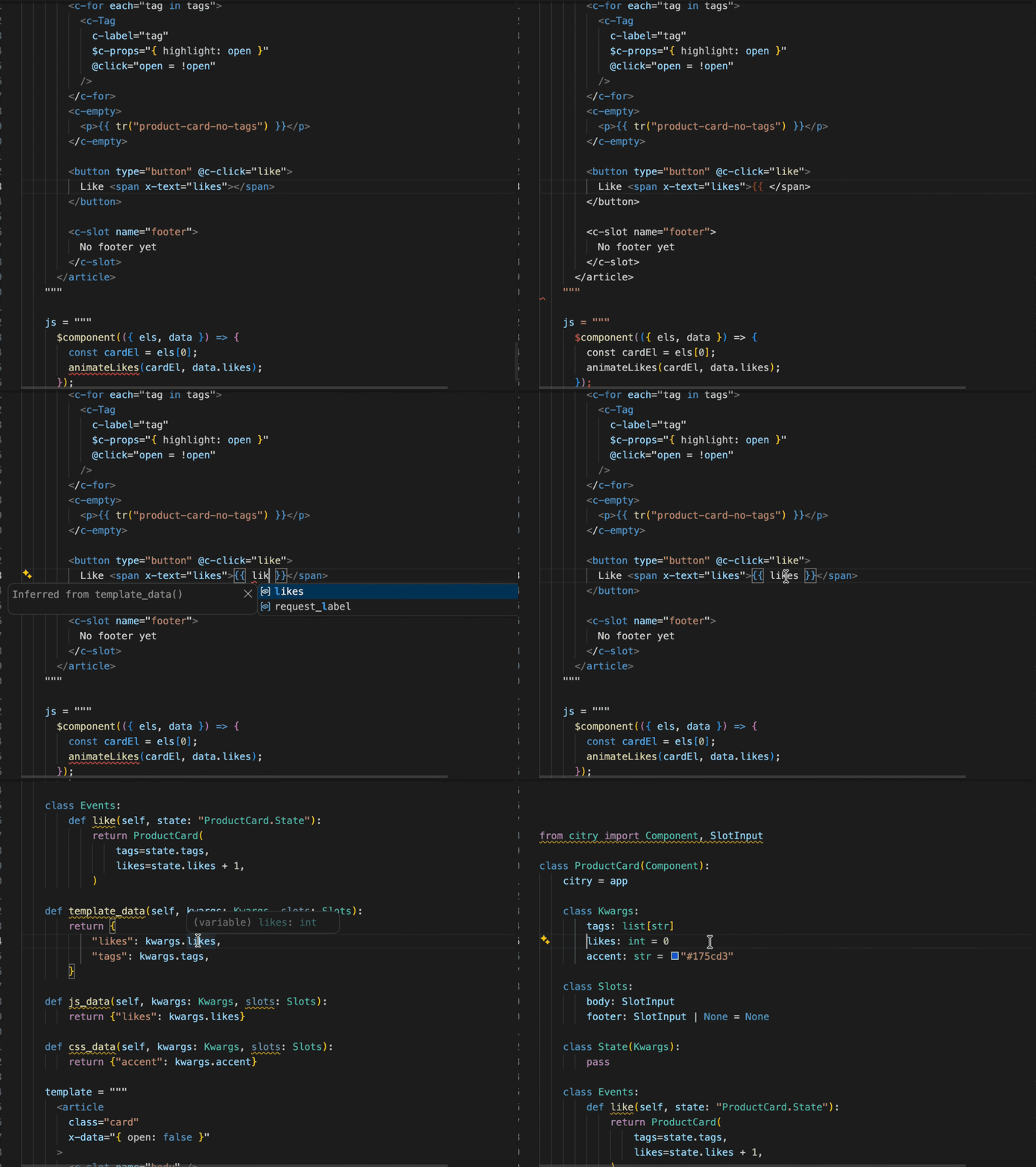
Citry completes registered components and their inputs without leaving the Python file:
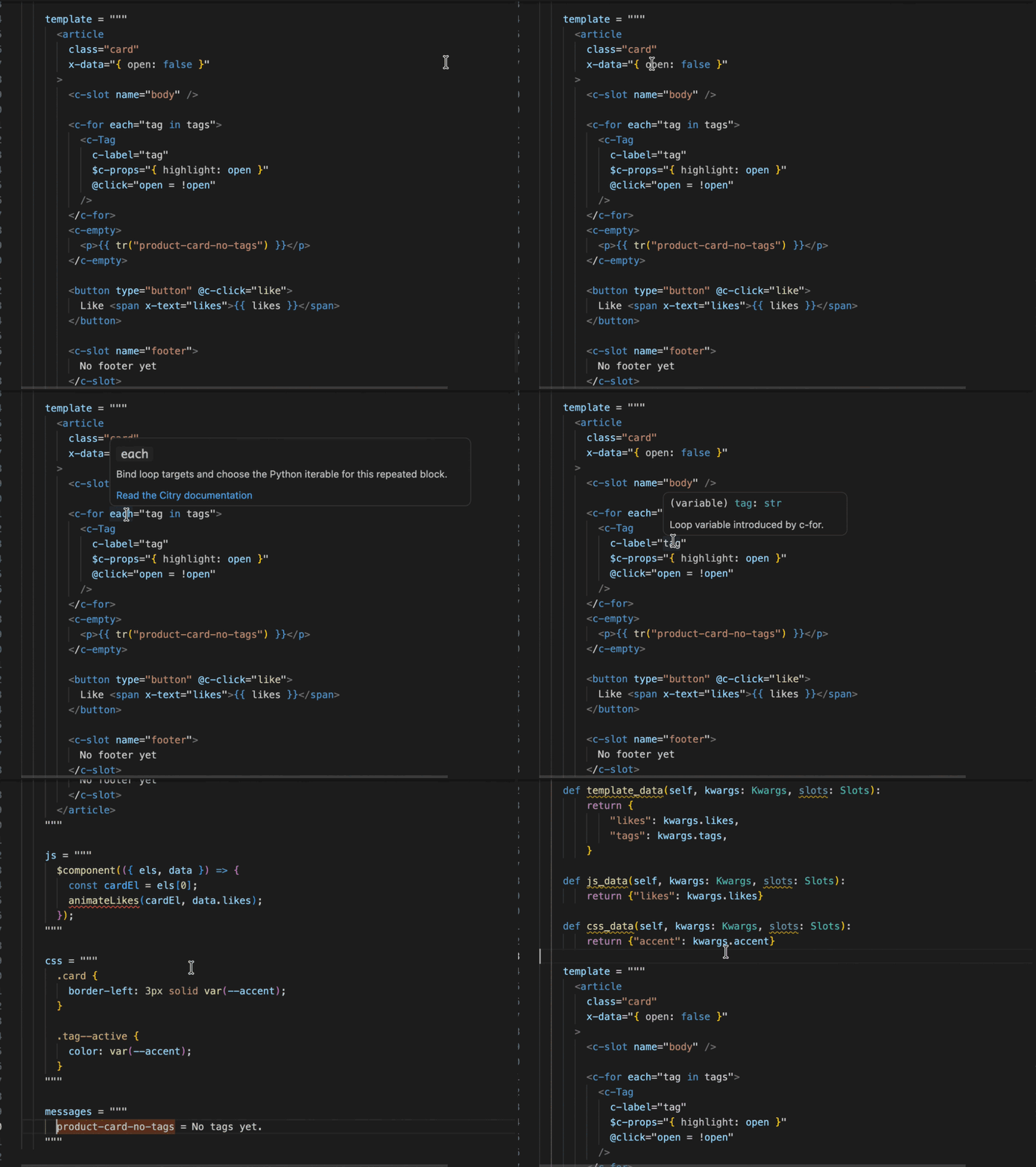
Hover hints explain template values, while references and navigation connect them to their Python definitions:
Install the language server
Install citry-lsp in the same Python environment as the Citry project:
python -m pip install citry-lsp
Keeping the server in the project environment lets it import the registered component catalog. An isolated server can still check syntax, but it cannot know the application's component names, inputs, or slots.
Install Citry from the Visual Studio Marketplace or Open VSX. Cursor, Windsurf, VSCodium, and other compatible desktop forks can use the Open VSX release. The same qualified VSIX is attached to the GitHub Release.
Select the registry target
Set citry.app to the module:attribute path of either the project's Citry instance or a reusable ComponentLibrary:
{
  "citry.app": "myproject.app:citry_app"
}
For example, select the Citry UI library directly while working without a host application:
{
  "citry.app": "citry_ui:__citry_library__"
}
The library form creates an isolated registry with Citry's built-ins and that library. It does not include host-application components, configuration, or host-provided extensions. If the library requires one of those extensions, expose a configured Citry instance that installs it and select that instance instead.
The extension normally follows the interpreter selected by Microsoft's Python extension. Set citry.python to an explicit executable when that integration is unavailable:
{
  "citry.python": "/path/to/project/.venv/bin/python"
}
If importing the selected app needs environment variables, point citry.envFile to a dotenv file:
{
  "citry.app": "myproject.app:citry_app",
  "citry.envFile": "${workspaceFolder}/.env"
}
Relative paths resolve from the workspace folder, and file values override variables inherited by the Extension Host. Citry applies them only to its isolated app-discovery worker; it does not change the environment of the language server, Python extension, terminal, application server, or tests. Saving, creating, or deleting the file automatically reloads the component registry. A configured file that is missing or malformed keeps syntax-only features available and explains the setup failure in Citry: Show Language Server Status. Citry's environment adapter does not print parsed values.
For Django, include settings needed before importing the selected target. The language server imports that module directly and does not run manage.py:
DJANGO_SETTINGS_MODULE=myproject.settings
DJANGO_SECRET_KEY=editor-development-secret
With no app configured, the status bar reports syntax only. Definite inline templates and files explicitly using the Citry Template language are still checked, but unknown components and their contracts are not inferred.
Complete Alpine and component JavaScript
In a registry-owned component template, Citry connects Alpine expressions to the component's browser data:
class Search(Component):
    class JsData:
        query: str
        result_count: int

    class State:
        page: int

    template = """
      <p x-text="query.toUpperCase()"></p>
      <button @click="$state.page += 1">Next</button>
    """
Top-level JsData names complete in x-*, @*, and :* values. Hover shows their JSON-derived JavaScript type, and Go to Definition, Go to Declaration, and Find All References connect them to the exact Python field or a conservatively inferred js_data() dict key. Public Events State fields receive the same navigation through $state.
The component's direct js or resolved js_file receives matching types for the complete $component callback context. Direct synchronous writes to scope become typed Alpine names, and x-for bindings receive iterable-derived types and exact navigation. A static $component({ props, init }) declaration also types its read-only props. VS Code's installed JavaScript service supplies ordinary JavaScript member completion, hover, and definitions; Citry keeps the Python-backed origins authoritative. Unknown Alpine roots are errors by default through the shared Citry lint policy. Free names inside a $component initializer are also errors by default, which catches a context value such as scope when it was used but not destructured. Configure the severity or real host-provided globals through LintSettings; see Template linting.
Hovering $component, a destructured callback value, or a Citry Alpine magic such as $sendEvent, $loading, or $error shows its Citry contract and a link to the matching browser API reference. Handler-name completion opens inside the literal arguments to sendEvent, $sendEvent, $loading, and $error, including from an empty string.
A literal sendEvent() or $sendEvent() name, a declarative @c-* handler, and a handler passed to $loading() or $error() must match an effective Python event handler and navigate to that method. Dynamic names are left open, as are all onEvent() and $onEvent() names.
Direct $c-props objects on statically resolved child components validate unknown keys, required props, and proven value types against the child's static $component({props}) declaration. A prop key hovers and navigates to that declaration. A spread keeps explicit keys checkable but suppresses a missing-required conclusion; dynamic targets and c-$c-props remain unproven. When a JsData annotation or known literal value cannot cross Citry's strict JSON wire, Citry reports citry.js-data.unsupported-type as a warning and lets JavaScript tooling treat that value as unknown.
Navigate i18n messages and profiles
When the selected application configures i18n, Citry uses its checked catalog index across Python, templates, Fluent, Alpine, and component JavaScript. Literal message IDs complete and navigate from tr(), <c-trans message="...">, self.i18n.tr(), Component.I18n.client_messages, $i18n.tr(), and the injected component i18n service. Checked $c-tr:message.output[target] directives and bounded i18n.bind({ message: "...", output: "..." }) calls use the same index. Go to definition on a $c-tr message opens the selected message value, or the exact Fluent attribute when the directive includes .output. Hover shows the selected output, its typed direct and transitive parameters, translator descriptions, and defining owner. The catalog belongs to the selected Citry application, so a definition may live in another component, another Python file, or a configured catalog package.
Hover an argument name such as count in tr("account-unread", count=value) to see its @param type and description. Go to definition on that argument to open the exact @param declaration. The same rule works in template and Python tr() calls, Alpine $i18n.tr(), the injected component JavaScript i18n.tr(), and literal <c-trans> values and fills.
Named formatter and parser profiles complete in the matching operation, such as fmt.number(..., format="..."), self.i18n.parse.percent(...), and $i18n.format.currency(...). Template fmt methods include their call signatures and return types. A misspelled template method or a literal profile that is not registered for that exact operation is an error. $i18n and the i18n value in a $component callback include the nested context, format, and parse APIs. Public Fluent message references navigate to the same defining source; private term references navigate within their own messages block.
The live diagnostics use the same Rust Fluent parser and checked app catalog. They report unsupported @param types, unknown literal keys or profiles, missing, extra, or provably mistyped message arguments, and mismatched <c-trans> values or fills. $c-tr values receive the same named-input checks, and malformed directive names such as $c-tr:, $c-tr:notice[], or $c-tr:notice. are errors before rendering. Component inputs complete in both their static form (client) and their expression form (c-client). $i18n receives semantic help only inside a statically known client-enabled <c-i18n> provider; a server-only nested provider blocks that scope.
These features need citry.app, because syntax-only mode has no complete catalog or profile registry. Fluent syntax coloring itself remains available without the application index. Static checks follow literal message IDs, literal profile names, and statically named argument-object keys. A dynamic message ID or computed argument object remains a runtime responsibility.
Navigate from CSS variables to Python data
When the selected registry owns a component's CSS, Citry connects a var(--name) use to the Python data that produces it:
from citry import Component


class Chart(Component):
    class CssData:
        chart_height: str

    css = """
    .chart {
        height: var(--chart_height);
    }
    """
Inside var(--...), completion offers exact CssData names. Hover shows the Python producer, Go to Definition and Go to Declaration open its field, and Find All References lists uses in that physical stylesheet. The same features work for direct string keys inferred conservatively from css_data(), so {"row-color": value} is available as --row-color.
Both direct css literals and resolved css_file files are supported. A CSS file shared by several components exposes only names supplied by every proven owner. Saving or synchronizing a Python edit rechecks the schema and asset owner before Citry returns navigation.
Citry leaves other custom properties alone. A value may come from an ancestor, the host page, a theme, JavaScript, an extension, or another stylesheet, so an unmatched var(--host-token) is not an error. VS Code's CSS service continues to provide ordinary CSS completion, validation, and local custom-property navigation alongside Citry's producer information.
Associate standalone templates
Citry accepts any filename in template_file, so the extension does not claim ordinary .html files. Add a project-specific association when appropriate:
{
  "files.associations": {
    "templates/components/**/*.html": "citry-html"
  }
}
Format Citry documents
The command palette exposes only two Citry formatting commands:
- Citry: Format Document formats every definite direct
template,js, andcssliteral in the current Python file. - Citry: Format at Cursor formats only the direct literal body containing the cursor.
Formatting expands Citry/HTML structure and formats embedded JavaScript and CSS while preserving readable Python triple-quoted strings:
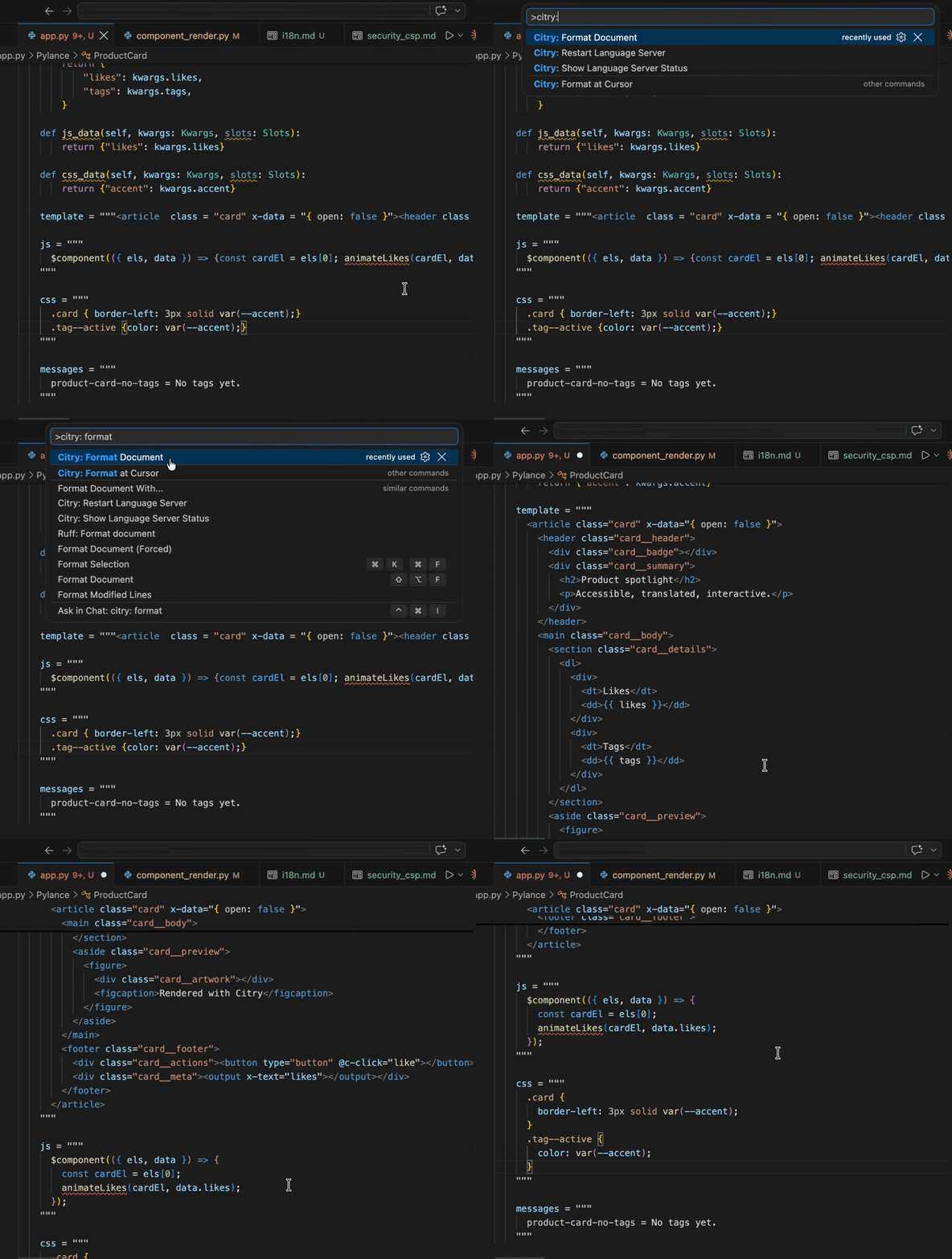
The commands do not format messages blocks or standalone .ftl files. Fluent syntax highlighting is available in both places, but Citry does not yet define a Fluent formatting contract.
Both include Citry/HTML structure and Python expressions, eligible direct JavaScript and CSS, and eligible <script> and <style> bodies. A cursor on a template_file, js_file, or css_file path, a method such as template_data, or unrelated Python code is outside a format region and is refused without edits. The commands do not follow a Python declaration into another file; open the target directly or use citry format for statically resolved file assets. For a standalone JavaScript or CSS file, “directly” means its normal language formatter; Citry does not wrap generic JS/CSS documents.
A file in the Citry Template language is one template, so either command formats the whole document. The explicit commands also accept an HTML-mode file that the configured registry proves is a resolved template_file, while unrelated HTML is refused. Associate the file with citry-html to use VS Code's standard formatter and format-on-save:
{
  "[citry-html]": {
    "editor.defaultFormatter": "citry-dev.citry",
    "editor.formatOnSave": true
  }
}
Citry includes Prettier for deterministic embedded JavaScript and CSS formatting. If Prettier for VS Code is installed and selected for that language, Citry uses its dedicated action so your workspace Prettier configuration applies. Otherwise it uses bundled Prettier 3.9.6 with Citry's canonical two-space indentation. Your default formatters for standalone JavaScript and CSS files remain unchanged. The CLI uses its explicit native Biome adapter.
Whitespace-sensitive multiline literals/comments and position-sensitive hashbang, @charset, or BOM bodies are also left unchanged rather than being unsafely reindented.
Keep the normal Python formatter selected and add Citry as an independent save action. This uses the same whole-document Citry behavior as Citry: Format Document:
{
  "[python]": {
    "editor.codeActionsOnSave": {
      "source.format.citry": "explicit"
    }
  }
}
The Citry/HTML and built-in Python-expression, c-for, and c-fill data passes produce the same bytes across the CLI, Python API, language server, and extension. Embedded JavaScript/CSS output also matches when the provider, version, and options match. For deterministic automation, configure the CLI's explicit Biome adapter instead of relying on editor provider ordering.
Look up Citry syntax
Hover a Citry structural tag, fixed directive, or structural attribute to see a concise explanation and a link to its full Citry guide. This works in syntax-only mode, so <c-slot>, required, c-bind, #c-key, and related syntax do not require an application registry or an installed HTML provider. Dynamic HTML attributes such as c-class keep using the HTML provider's documentation for their underlying native attribute.
HTML assistance also enters parser-proven nested-template values. Use the opposite quote for attributes inside the nested value, so a double-quoted host contains ordinary single-quoted HTML attributes:
<c-card c-body="<><input type='email' autocomplete='email' /></>" />
Completion, hover, and go to definition are mapped back from that isolated fragment. For <c-element>, a literal target such as is="form" receives form-specific attribute intelligence. A dynamic c-is or c-bind keeps only global HTML attributes because its eventual tag is not proven. Citry returns no forwarded result when the current parse, source map, provider response, or document version is uncertain.
Complete template roots
Inside a registry-owned component template, Citry completes and documents declared TemplateData fields, runtime template_globals, and lint-only variables in interpolations and Python-valued attributes. Global runtime values receive conservative inferred types; explicit annotations and descriptions use the application's template lint settings. When no TemplateData schema is declared, it also infers conservative roots from direct dict keys and modelled mapping operations in template_data(). The inherited implementation exposes effective Kwargs fields automatically. Go to definition targets the annotated field or exact returned dict key. Go to references lists uses of the same proven root or exact loop/fill binding inside that physical template. Go to declaration targets the authored field, dict key, or lexical introduction. Go to type definition targets the actual Python class or standard-library type when every component consumer and return path produces a safe mapped answer. Unused fill bindings target their current neutral Any contract. Unsaved Python edits that change component inheritance or template ownership are revalidated before these registry-backed results are shown. The live ownership proof covers direct string and pathlib.Path(...) declarations. Imported constants, factories, decorators, metaclasses, and other dynamic template selection use the loaded registry, but variable navigation is withheld while Python source is synchronized because those dependencies cannot be bounded safely. Save and restart the language server to refresh that registry state.
Once a root is proven, Citry also supplies ordinary Python member and call completion, type hover, user-member navigation, signature help, and mapped diagnostics. This works in interpolations, Python-valued attributes, loop clauses, and nested templates. Template conditions narrow optional and union types, while shared templates keep only suggestions that apply to every proven component consumer and return path.
Citry also gives every name used as a call target the standard Python function or method syntax scope. That keeps calls such as tr(...), fmt.currency(...), and application helpers visually distinct even before the language server has enough project information to prove their types. A member that is only read, such as fmt.currency without (...), keeps its ordinary member scope.
The language server installs its supported Python analyzer automatically in the same environment. If that analyzer cannot start or stops responding, Citry reports the degradation once and keeps parser checks plus root-level completion, hover, and navigation available. Unknown root names use the policy configured on the Citry application, not a separate VS Code preference.
Open Python files use synchronized editor text, so adding or renaming a direct key updates completion, hover, and navigation without saving or reloading the app. Invalid source, ambiguous ownership, unsupported mapping escapes, and roots not shared by every physical-template consumer are withheld rather than guessed. The semantic analyzer is likewise limited to those mapped template expressions and does not replace the Python extension for ordinary .py code.
Keep template strings from becoming f-strings
Pylance can add an f prefix when you type { in a Python string. Its python.analysis.autoFormatStrings setting is off by default. If your profile or workspace enables it, add this workspace setting:
{
  "python.analysis.autoFormatStrings": false
}
The setting applies to every Python file in the VS Code window. Pylance does not provide a per-literal exception. Citry does not reverse editor changes, so deliberate f-strings remain untouched. Editors without Pylance do not need this setting.
Current limits
- Highlighting of deeply nested or unfinished expressions is best effort.
- Parsing stops after the first syntax error.
- General Python-file analysis remains the responsibility of the configured Python extension; Citry analyzes only mapped template expressions.
- Embedded CSS and JavaScript receive highlighting, completion, hover, and formatting through VS Code providers, but Citry cannot request their diagnostics through VS Code's public API.
- Embedded JavaScript and CSS use bundled Prettier 3.9.6 unless Prettier for VS Code is installed and selected for that language. Other editor formatters do not replace that fallback.
- Each embedded provider pass is bounded to 30 seconds. VS Code does not expose cancellation for the underlying public formatter command, so Citry discards any result that arrives after that bound.
<script>and<style>bodies containing Citry interpolation remain unchanged until a context-safe placeholder adapter is available.- A TextMate grammar cannot prove that a class with a
template,js, orcssassignment inherits fromComponent, so unrelated assignments with those exact names may receive Citry highlighting.